Understanding Birdcalls: Data Collection Prototype
This is the first update for the understanding birdcalls project. See the project page for more context.
Progress
So far, I’ve built a portable data collection platform and written some initial recording and processing scripts for it.
Hardware
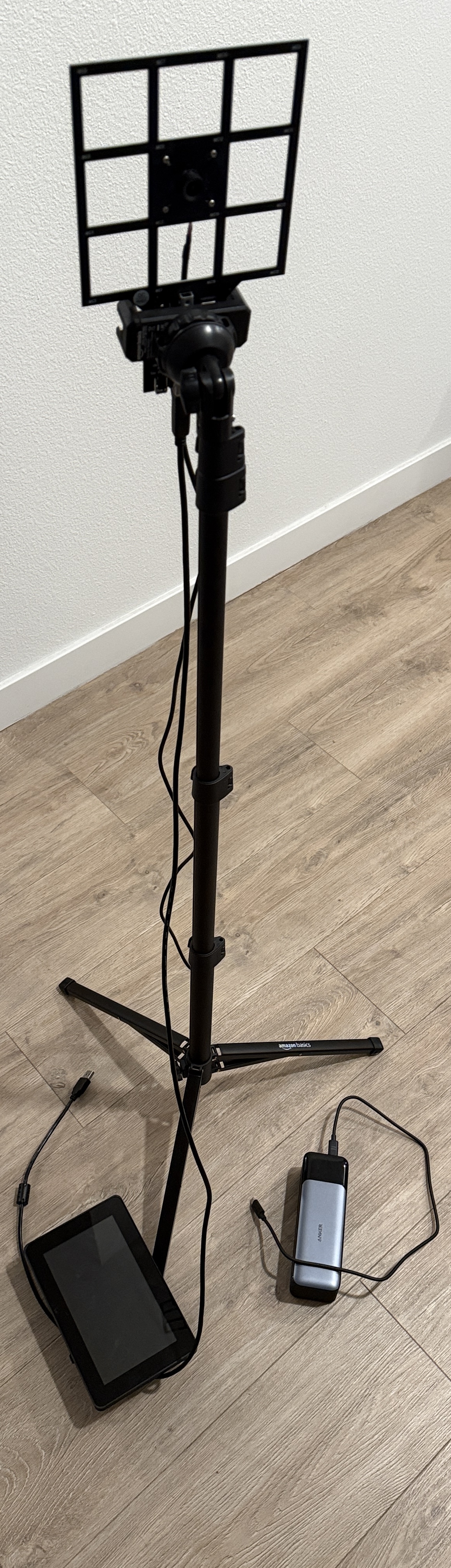
The entire platform is built around the miniDSP UMA-16 v2, a 16-channel microphone array in a 4x4 uniform rectangular arrangement. It ships with a 1080p RGB camera, which lets us use the device as an acoustic camera, with images from the camera and beamformed sound from the microphones. While this is mostly plug-and-play with a laptop, I decided to connect it to a Raspberry Pi 5 with a touchscreen and mount it on a tripod for extra portability.
Full details and costs are below:
With taxes, tariffs, and shipping fees, my actual out-of-pocket came out to around $862.
To case the Raspberry Pi 5 along with the touchscreen and the power delivery board, I’ve used variants of the models by Chaddles McGee. Unfortunately, I can’t share my edits due to licensing, but huge thanks to them for making their models public.
Software
The code powering the device is available at https://github.com/tchittesh/nature-sense.
Currently, the data collection pipeline has three stages: calibrate, record, and reprocess.
Calibration (calibrate.py) is best run with the acoustic camera connected to a laptop. It displays a checkerboard pattern on the laptop screen and uses it to calibrate the intrinsics and distortion of the camera.
Recording (record.py) captures synchronized 16-channel audio from the miniDSP UMA-16 at 48 kHz and video at 60 FPS. Audio is stored in HDF5; video in MP4. A sync.csv logs per-frame timestamps and detects sample rate drift — one early session showed ~1.5% clock slew, which sync.csv catches and corrects for in postprocessing.
Reprocessing (reprocess.py) runs time-domain acoustic beamforming over a 20×20 grid (5m × 3m at 2m depth) targeting the 4000 Hz band, which is the frequency I produce on my phone for testing purposes. There is a visualization option that overlays the heatmap on the original video with a green crosshair at the most likely sound source.
A first test session captured about 50 seconds of synchronized audio and video (~169 MB audio, ~241 MB video). The phone, which is producing a 4000 Hz tone, is being tracked via beamforming, although there is a fair bit of noise, presumably due to indoor reflections and the limited region we’re running the beamforming search over.
Next Steps
Here’s what I want to tackle next:
- attach RPi and power bank to tripod for more portability
- collect and process actual birdcall data!
Some thoughts in the back of my mind:
- How can I calibrate the extrinsics of the camera with respect to the microphone array? Will it be important to also finetune the microphone locations (from the CAD expected values) and gains as part of calibration?
- Will reflections be a problem in my backyard? If so, how can I deal with them?
- How will acoustic beamforming for sound separation compare with learned approaches like SAM-Audio, biodenoising, and BioCPPNet?
One thing I realized is that we don’t actually need to solve the full multi-source, unknown-frequency, unknown-location sound separation problem using beamforming alone. We can instead use the camera to detect and track all bird instances visually, and then use beamforming more simply to extract the directional audio corresponding to each track. This camera-guided approach sidesteps a hard blind source separation problem and replaces it with a much more tractable targeted one.